
Disable the automation
Go to Board Automations, find the template, and toggle it OFF. This stops future rollups but keeps the app installed.

Automatically summarize your subitems — sum, average, status, and more — into the parent item. Unlike monday's native mirror column, the result lives in a standard column you can use in any automation.
monday's native subitem summary creates a special mirror column. It's great for viewing aggregated data, but most automations and integrations cannot read or trigger on its value, so you can't use it in standard conditions.
We provide a custom automation template that takes subitem column values and writes the result into a normal item column (Number, Text, Date — whatever fits).
Because the result is in a standard column, you can use it in any automation, integration, or dashboard widget that expects standard data — plus we offer summary methods beyond the basics.
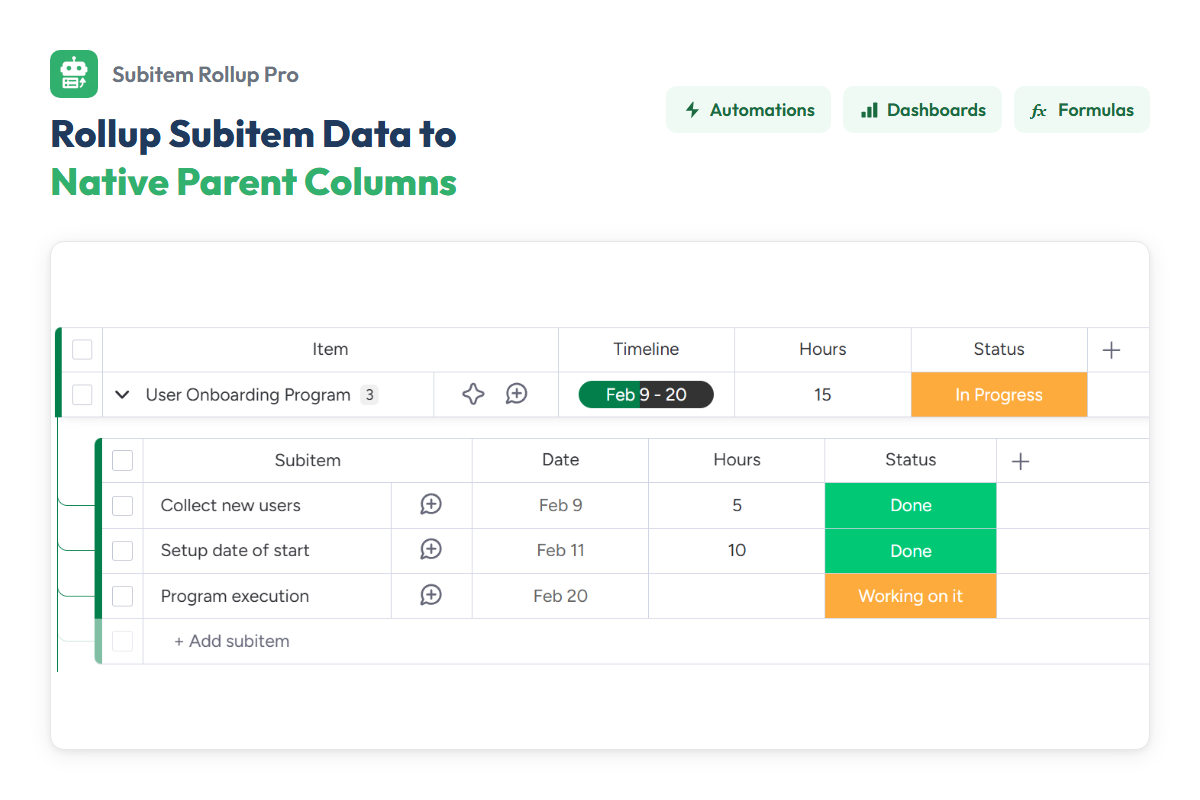
We don't poll your data or run anything in the background. Subitem Rollup Pro ships a custom trigger and action block that plug straight into monday.com's automations framework — same engine, same permissions, same audit log. Wire them via our pre-built template, or compose a flow in the Workflows builder.
When {event types} happen in {subitem column} roll up {subitem column} to {parent column} using {rollup type}.
The four tokens
The subitem events that trigger the rollup — column value changing, subitem created, moved, or deleted. Pick one or more; the rollup recalculates whenever any selected event fires.
The subitem column to work with. It appears twice: the first instance is where the events happen (the column being watched); the second is the source (the column to summarize). Usually the same — but you can listen on one and roll up another.
The target column on the parent item where the result is written.
A predefined rollup (Sum, Average, …) or one of your saved custom types. Custom types are created in the Subitem rollup configurator.
Watch the template being added to a board's automation center and configured in under a minute.
For more flexibility, we provide dedicated trigger and action blocks in the monday.com Workflows builder. Pair the trigger with the action to listen for subitem changes and write the result to the parent — or combine them with other blocks for multi-step processes.
See the trigger and action blocks being wired up in the Workflows builder, side-by-side with monday's native blocks.
A board view where you build custom rollup types with advanced logic — filters, status mappings, and more. Once saved, your custom types appear in the {rollup type} picker of both the template and the action block.
Create filtered rollups and status-to-status mappings, then save them as reusable types.
Create filtered rollups that only include specific subitems. For example: Sum of "Budget" only where "Status" is "Approved".
Map combinations of subitem statuses (e.g. "All Done", "Any Stuck") to a specific status on the parent item.
From install to a live rollup writing into your parent items.
2.1 — Choose your method
Use our pre-configured app template in your board's Automations center, or build a custom process with our blocks in the Workflows builder.
2.2 — Configure trigger and action
If using the automation template, fill in the sentence: "When {event types} happen in {subitem column} roll up {subitem column} to {parent column} using {rollup type}."
If using Workflows, configure both blocks: set the trigger (board, subitem column, event types), then set the matching action (source, parent, rollup type).
In either case the core fields are:
2.3 — Test the automation
Return to your board, trigger one of the configured events — change a subitem column value, or create/delete a subitem — and watch the parent item update automatically.
Skip this step if you only need standard rollups (Sum, Average, …) across all subitems. App authorization is only required when you open the configurator view.
Use the Subitem rollup configurator view to construct advanced logic:
All rollups occur within a single board. Cross-board rollups are not supported.
Tip — click any rollup chip below to see a description and example.
| Source | Target | Predefined rollup types |
|---|---|---|
|
Numbers
|
Numbers | sum average median min max count |
|
Time Tracking
|
Numbers | sum average min max |
| Text | sum average min max | |
|
Date
|
Date | earliest latest |
| Timeline | total | |
|
Timeline
|
Timeline | show |
| Date | earliest latest | |
| Numbers | Timeline span (days) Sum of durations (days) | |
|
People
|
People | list |
| Dropdown | list | |
| Numbers | count_all count_distinct | |
|
Status
|
Numbers | percent_done count_not_done count_done count_total |
| Text | ratio_done label_histogram | |
| Status | custom |
Disable the automation any time, or fully uninstall — your data stays put.
Go to Board Automations, find the template, and toggle it OFF. This stops future rollups but keeps the app installed.
Go to Apps → Manage Apps and uninstall "Subitem Rollup Pro". Existing data in your columns remains safe.
Start free for 14 days. Scale when you need to.
For small teams getting started
billed monthly
For growing teams with more boards
billed monthly
For larger teams and power users
billed monthly